PolyField App connects to a server that can run on Mac, Linux and Windows. This server is the brains of the application, housing results and managing the download and upload from competition managment providers like Athletics.app, Roster Athletics and Open Track.
The server is backwards compatible with FieldLynx/NetExchange, supporting the EVT and LFF file formats for defining events and exporting results.
All our visulisations are created here, giving the optimum athlete, official and spectator experience.
Set the file directories in the server
This links the local disk for storage of the event and result files, enabling competitions to continue even if the internet fails. The result files are fully compatible with FieldLynx systems, allowing Polyfield to integrate with any providers that support FieldLynx via NetExchange through their own 3rd party agents. This includes; LynxPad, Hy-Tek, Athletics.net via athleticLIVE, Meet PRO.
The link to PolyField Analytics is also setup here, allowing heatmap generation and web upload for all throws events.
Set the Competition Management Mode
Link to your favorite competition management provider or set your competition up locally.
Athletics App configures simply with the link code available from your competition result tab. It has full support for downloading events and uploading results.
Open Track requires input of your username, password. This will display all competitions you have right to access (Director) for selection. It has full support for downloading and uplaoding results.
Roster requires input of your username, password and URL of the competition. It currently only supports downloading of events.
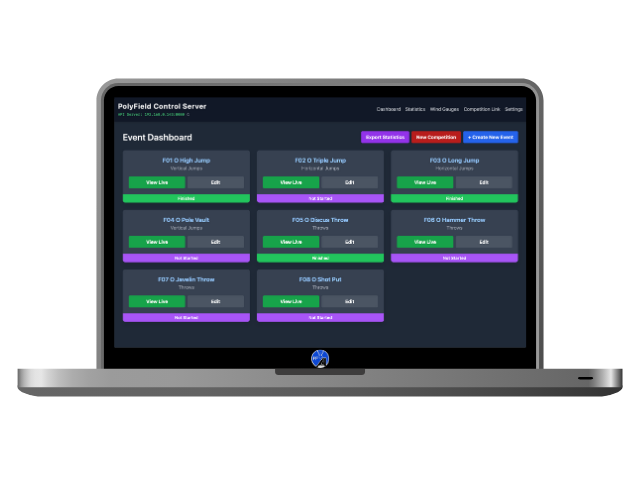
Event Dashboard
Loaded from the Competition Management provider i.e. Manual Input, Athletics App, Roster or Open Track.
You can click on View Live to monitor the event in real time.
You can add events.
You can Edit events.
Please note. If you add and edit events whilst in a linked mode, the change may not reflect on the competition managment software, changes should be initiated in those softwares first, these will then reflect through a sync with this dashboard.
New Competition wipes all settings and resets ready for the next weekend!
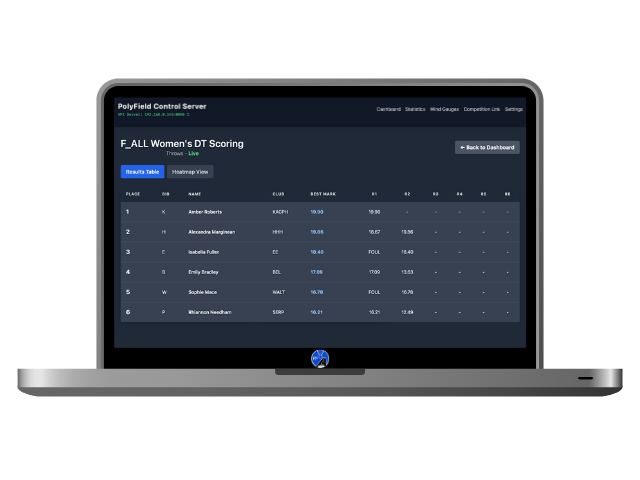
Live View - Results Table
Each event will update the results table in real time, this can be viewed by clicking View Live.
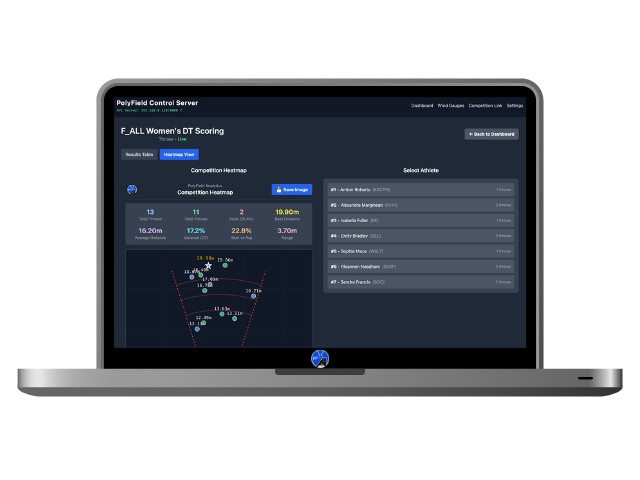
Live View - Heat Map
The Heat Map view will populate live as the results are measured, plotting onto the graphic with the exact placement of the implement landing.
There are statistics auto generated and updated as the throws are recorded.
The heat map can be refined by athlete or viewed as a whole competition. The rounds are colour coded with a key at the bottom.
The Save Image button can be used to export a social media ready Heat Map.
Social Media Exports - Individual Heat Maps
Instagram and Facebook ready graphics of the athlete heat maps are exportable.
Social Media Exports - Competition Heat Maps
Instagram and Facebook ready graphics of the competition heat maps are exportable.